
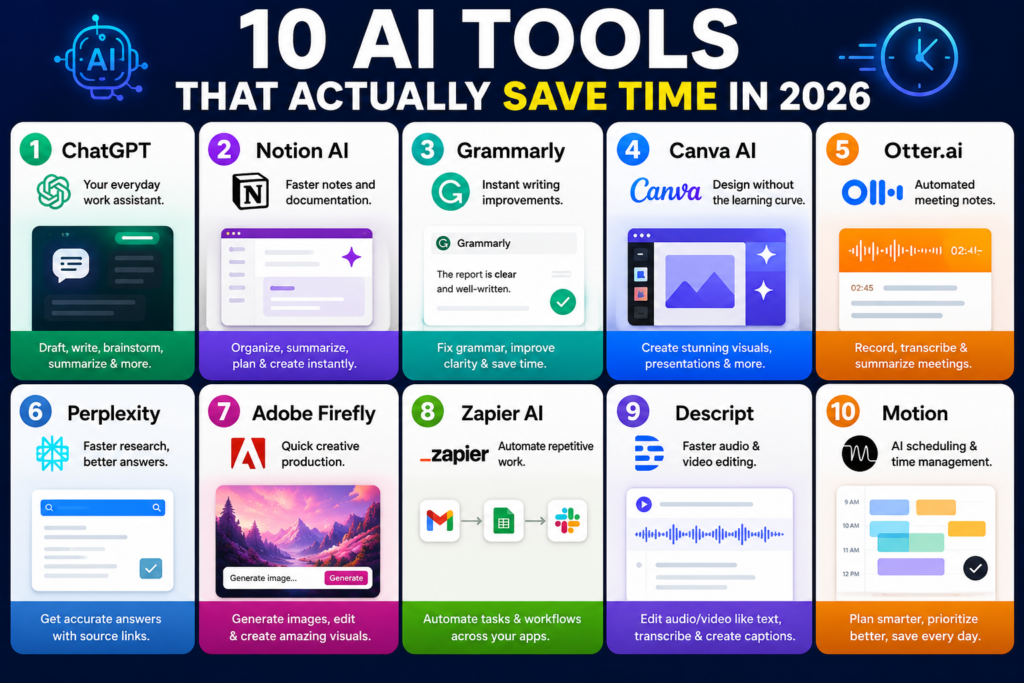
Artificial Intelligence has moved beyond being a trend. In 2026, AI tools are becoming practical everyday assistants that help people finish tasks faster, reduce repetitive work, and focus on what matters. Whether you are a student, freelancer, entrepreneur, content creator, or office professional, the right AI tools can save hours every week.
The challenge is not finding AI tools anymore-it’s choosing the ones that genuinely improve productivity instead of adding complexity.
Here are 10 AI tools that actually save time in 2026.
1. ChatGPT – Your Everyday Work Assistant
ChatGPT has become one of the most versatile productivity tools available. Instead of opening multiple tabs to research, draft content, summarize documents, or brainstorm ideas, users can do everything in one conversation.
You can use it to:
- Draft emails
- Create blog outlines
- Summarize long articles
- Generate ideas
- Explain difficult concepts
- Improve writing
2. Notion AI – Faster Notes and Documentation
If your notes are scattered across notebooks, apps, and screenshots, Notion AI helps organize information automatically.
It can:
- Turn messy notes into structured documents
- Summarize meeting discussions
- Generate project plans
- Create content drafts
Instead of spending time formatting and organizing, users can focus on thinking and execution.
3. Grammarly – Instant Writing Improvements
Writing and editing often take longer than expected. Grammarly helps by checking grammar, improving clarity, adjusting tone, and refining sentence structure in real time.
This tool is especially useful for:
- Emails
- Blog posts
- Business communication
- Reports
It reduces editing cycles and makes writing more efficient.
4. Canva AI – Design Without the Learning Curve
Creating presentations, social posts, banners, and graphics used to require design skills. Canva AI allows users to generate layouts, images, and marketing materials quickly.
Popular uses include:
- Social media posts
- Presentation decks
- Marketing graphics
- Quick branding materials
You no longer need to spend hours adjusting visual details.
Time saved: Several hours per project.
5. Otter.ai – Automated Meeting Notes
Meetings can become productivity traps when people spend time taking notes instead of participating.
Otter.ai automatically records, transcribes, and summarizes conversations.
Useful for:
- Team meetings
- Interviews
- Online classes
- Client calls
After meetings, participants receive searchable summaries and action points.
6. Perplexity – Faster Research
Traditional search engines often require opening many tabs and filtering information manually.
Perplexity speeds up research by providing concise answers with source references.
Great for:
- Market research
- Learning new topics
- Quick fact-checking
- Competitive analysis
This makes information gathering significantly faster.
7. Adobe Firefly – Quick Creative Production
For people working with visual content, Adobe Firefly simplifies image creation and editing.
You can:
- Generate graphics
- Edit backgrounds
- Create marketing visuals
- Produce concept designs
Instead of waiting for multiple design revisions, ideas move faster.
8. Zapier AI – Automate Repetitive Work
One of the biggest productivity gains comes from automation.
Zapier AI connects apps and creates workflows automatically.
Examples:
- Save email attachments to cloud storage
- Move form responses into spreadsheets
- Send notifications automatically
- Trigger repetitive business processes
Once configured, workflows continue working in the background.
9. Descript – Faster Audio and Video Editing
Editing audio and video traditionally requires technical knowledge and patience.
Descript makes editing feel like editing text.
Features include:
- Automatic transcription
- AI voice cleanup
- Video editing
- Caption generation
This is especially valuable for podcasters and content creators.
10. Motion – AI Scheduling and Time Management
Productivity is not only about doing more—it’s about prioritizing better.
Motion automatically schedules tasks and meetings based on deadlines and availability.
It helps users:
- Plan workdays
- Rearrange priorities
- Avoid calendar overload
- Focus on high-value tasks
Instead of managing time manually, the tool continuously optimizes schedules.
Final Thoughts
The best AI tools in 2026 are not necessarily the most advanced—they are the ones that quietly remove friction from everyday work.
A good rule is simple: if a task feels repetitive, there is probably an AI tool that can reduce the effort.
Start with one or two tools instead of trying everything at once. Build habits around them, measure the time you save, and expand only when it genuinely improves your workflow.
AI works best when it supports human decisions—not when it replaces them.